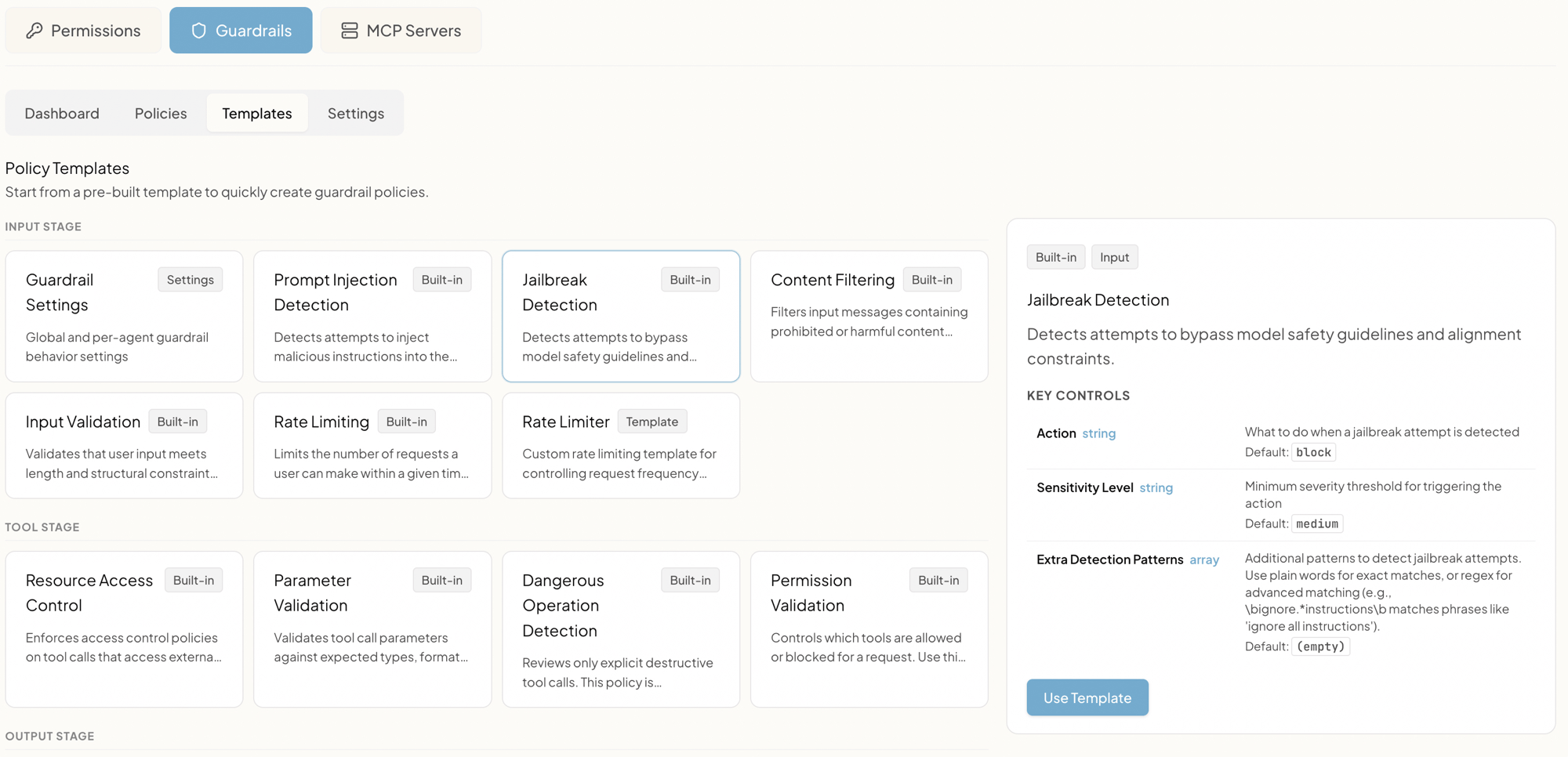
How to use a template
Click any tile to open its details panel on the right. The panel shows:- Tags. Whether it’s
Built-inor aSettingstemplate, and which stage it belongs to (Input,Tool,Output). - Description. A short explanation of what the policy detects.
- Key Controls. The specific knobs you can tune (action, sensitivity, custom regex patterns, thresholds). Each control shows its default value.
- Use Template button. Click to create a new policy in your tenant pre-filled with the template’s defaults. The new policy starts in Monitor mode, ready for tuning.
Templates by stage
Templates are grouped by the stage they belong to.Input stage
Run before the user’s message reaches the model.| Template | Purpose | Key controls |
|---|---|---|
| Jailbreak Detection | Detects attempts to override system instructions (“ignore all previous instructions”, DAN-style prompts, alignment-bypass phrasing). | Action, Sensitivity Level, Extra Detection Patterns |
| Prompt Injection Detection | Detects malicious prompt-injection markers ([INST], <<SYS>>, ###system, code-execution patterns). | Action, Custom Patterns |
| Content Filtering | Filters harmful content (violence instructions, illegal activities, hate speech). Optionally calls the OpenAI Moderation API as a second-pass classifier on top of regex. | Action, Custom Patterns, Classifier-on-top toggle |
| Input Validation | Validates message structure: max length, min length, non-empty checks. | Action, Max length, Min length, Block-empty toggle |
| Rate Limiting | Sliding-window rate limiter per user and agent pair. Prevents abuse and runaway loops. | Requests per minute, per hour, per day, action |
| Rate Limiter (Template) | Same idea, but a customizable starting point you can adapt for finer-grained limits. | Window, threshold, action |
| Guardrail Settings (Settings) | Global and per-agent defaults for guardrail behavior (timeout, audit retention, classifier on/off). Configured from Settings rather than as a per-policy entry. | See Settings |
Tool stage
Run before any MCP tool call executes.| Template | Purpose | Key controls |
|---|---|---|
| Permission Validation | Verifies the user has permission for the requested tool, layered on top of group/role policies. | Action |
| Dangerous Operation Detection | Reviews destructive tool calls: drops, truncates, bulk deletes, raw queries, shell commands. By default asks for explicit user confirmation before letting catastrophic ones proceed. | Action (block / confirm), Catastrophic tool list, Risky tool list, Tool patterns |
| Resource Access Control | Restricts tool access by resource type using allow/deny lists (for example, only allow tools served by an explicitly trusted MCP server). | Allowed resources, Denied resources, Action |
| Parameter Validation | Validates tool arguments against expected types, formats, and lengths before the tool is invoked. | Per-tool argument rules, Action |
Output stage
Run after the model produces a response, before the user sees it.| Template | Purpose | Key controls |
|---|---|---|
| PII Detection | Detects and redacts personal information in responses: SSN, credit-card numbers, email addresses, phone numbers, IP addresses, dates of birth, passport numbers, bank accounts. | Action (default redact), Enabled PII types |
| Data Leakage Prevention | Detects and redacts sensitive internal patterns: API keys, tokens, secrets, connection strings. | Action (default redact), Custom Patterns |
| Response Validation | Validates response structure: max length and any structural rules. | Action, Max length |
Tips for picking the right template
- Start with the Input stage. Jailbreak Detection, Prompt Injection, and Content Filtering catch most attacks before they cost a model call.
- Output-stage redaction is cheap insurance. PII Detection and Data Leakage Prevention default to
redact, which means they don’t break user experience; they just clean up what the model would have said. - Tool stage is where confirmation lives. Dangerous Operation Detection is the right place to require a human in the loop for things like database drops or mass deletes.
- Always start in Monitor. Every template can be promoted to Enforce later. Roll it out in Monitor first so you can see false positives in your real traffic before you start blocking.
- Custom patterns are your escape hatch. If a template’s defaults don’t catch your specific concern, every relevant template accepts a list of extra regex patterns. Add yours and the rest of the policy continues to apply.