> ## Documentation Index
> Fetch the complete documentation index at: https://docs.aperium.apps.hillspire.com/llms.txt
> Use this file to discover all available pages before exploring further.
# Audit log
> Review every permission change with timestamps, actors, and version numbers.
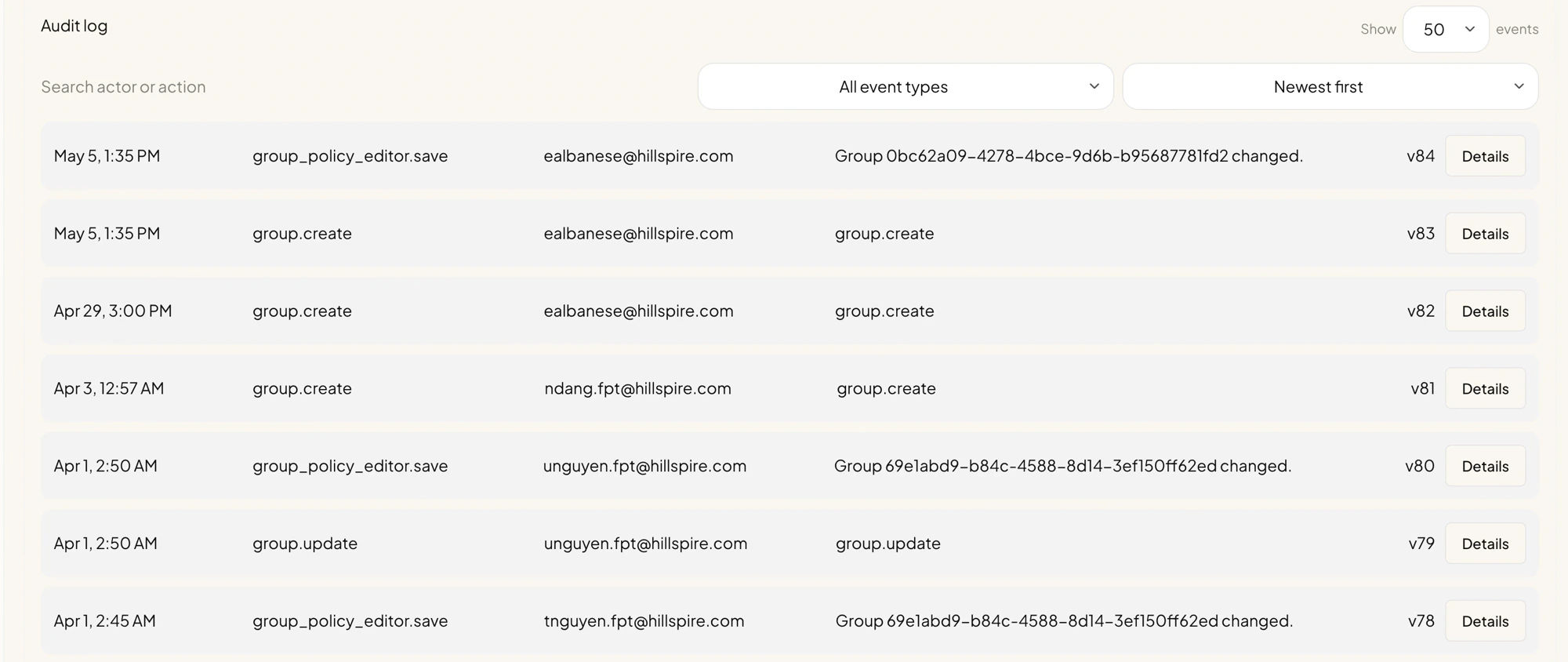
The **Audit Log** sub-tab is a chronological record of every permission-affecting change in your tenant. Use it to answer questions like "who edited the FPT Developers policy last week?" or "when did Eric become an admin?".
 ## What gets logged
Every change made through the **Permissions** sub-tabs produces an audit entry, including:
* Group lifecycle events (created, renamed, deleted).
* Group policy edits (server access levels, dataset rules, removed servers).
* User role and group changes from the **Users** tab.
* Invite creation, revocation, and consumption.
* Role policy changes (under the Advanced **Roles** sub-tab).
Each row records the **timestamp**, the **action**, the **actor** (the user who made the change), a **description**, and a **version number** that increments globally across the tenant.
## Filtering and searching
The toolbar at the top of the audit log lets you narrow the list:
* **Search actor or action.** Free-text search across the actor email and the action name.
* **All event types.** Filter to only certain action types (for example only `group_policy_editor.save`) when investigating a specific class of change.
* **Newest first / Oldest first.** Reverse the sort.
* **Show \_\_\_ events.** Page size. Larger numbers load slower but reduce paging.
## Viewing details
Click **Details** on any row to expand the full record for that event, including:
* The exact before/after values that changed (for policy edits).
* The full payload submitted to the change (for group create or invite create).
* The version number, useful when reading external tooling that references a specific version.
## Common investigations
### "Who removed someone's access yesterday?"
Filter by the user's email in the actor field, or by the affected user. Sort by newest first and look for `group_policy_editor.save`, `group.update`, or user-update entries around the time the access disappeared.
### "When was this group last modified?"
Search by the group's display name or system key. The most recent `group.update` or `group_policy_editor.save` row tells you when and by whom.
### "Has anyone changed the policy since our security review?"
Sort newest first and scroll back to the day of the review. Anything above that point is a change since.
## Notes
* The audit log records what changed; it does not record agent or tool usage. For runtime "did the user actually call this tool" questions, check your observability backend (Phoenix or your OpenTelemetry collector).
* Audit entries are append-only. There is no "edit" or "delete" path for audit log rows.
* Validation warnings shown on the **Overview** sub-tab are derived from the same data as the audit log; resolving them often involves cross-referencing the latest change to the affected group.
## What gets logged
Every change made through the **Permissions** sub-tabs produces an audit entry, including:
* Group lifecycle events (created, renamed, deleted).
* Group policy edits (server access levels, dataset rules, removed servers).
* User role and group changes from the **Users** tab.
* Invite creation, revocation, and consumption.
* Role policy changes (under the Advanced **Roles** sub-tab).
Each row records the **timestamp**, the **action**, the **actor** (the user who made the change), a **description**, and a **version number** that increments globally across the tenant.
## Filtering and searching
The toolbar at the top of the audit log lets you narrow the list:
* **Search actor or action.** Free-text search across the actor email and the action name.
* **All event types.** Filter to only certain action types (for example only `group_policy_editor.save`) when investigating a specific class of change.
* **Newest first / Oldest first.** Reverse the sort.
* **Show \_\_\_ events.** Page size. Larger numbers load slower but reduce paging.
## Viewing details
Click **Details** on any row to expand the full record for that event, including:
* The exact before/after values that changed (for policy edits).
* The full payload submitted to the change (for group create or invite create).
* The version number, useful when reading external tooling that references a specific version.
## Common investigations
### "Who removed someone's access yesterday?"
Filter by the user's email in the actor field, or by the affected user. Sort by newest first and look for `group_policy_editor.save`, `group.update`, or user-update entries around the time the access disappeared.
### "When was this group last modified?"
Search by the group's display name or system key. The most recent `group.update` or `group_policy_editor.save` row tells you when and by whom.
### "Has anyone changed the policy since our security review?"
Sort newest first and scroll back to the day of the review. Anything above that point is a change since.
## Notes
* The audit log records what changed; it does not record agent or tool usage. For runtime "did the user actually call this tool" questions, check your observability backend (Phoenix or your OpenTelemetry collector).
* Audit entries are append-only. There is no "edit" or "delete" path for audit log rows.
* Validation warnings shown on the **Overview** sub-tab are derived from the same data as the audit log; resolving them often involves cross-referencing the latest change to the affected group.